

How do I recover a deleted playlist on Spotify mobile?
0 Have you lost a damn good playlist on Spotify? Have you accidentally deleted it? Logged out from your account and now cant find the most favorite playlist of yours after logging in back to it? Do y…
Have you lost a damn good playlist on Spotify? Have you accidentally deleted it? Logged out from your account and now cant find the most favorite playlist of yours after logging in back to it? Do you want to recover your lost playlist on Spotify? Then this article is for your assistance.
Spotify retains your playlist and lets you use the Spotify recover playlist option to recover Spotify playlist from your account. To many of us, the desired playlist is very essential. The use of the Discord music bot on Spotify and many other similar tricks consumes a huge amount of time in our daily life. In those cases, good music must go on spontaneously. So losing a well-crafted Spotify playlist may seem costly.
Also Read:
How To Update To Spotify Premium?
How to Recover Lost Spotify Playlist On PC?
On your PC, restore deleted playlist using your web browser. Follow all these steps.
Step-1
-Visit your Spotify account page and log in to your account. If you are unable to log in to your account or forget your password, try to change Spotify password.
Step-2
-After logging in, click on your user badge
Step 3
-Select the recover playlist tab to recover the Spotify playlist and click on the restore option next to your desired playlist you want to recover.
Youll be able to restore deleted playlist back to your My Spotify Playlist.
How to recover lost Spotify playlist on Mobile?
To recover your lost playlist on your smartphone, you need to use your mobile browser. Follow the below steps:
Step-1:
-Go to spotify.com and log in to your account.
Step-2 :
-Click on your user badge, a pull-down menu will come up.
Step-3 :
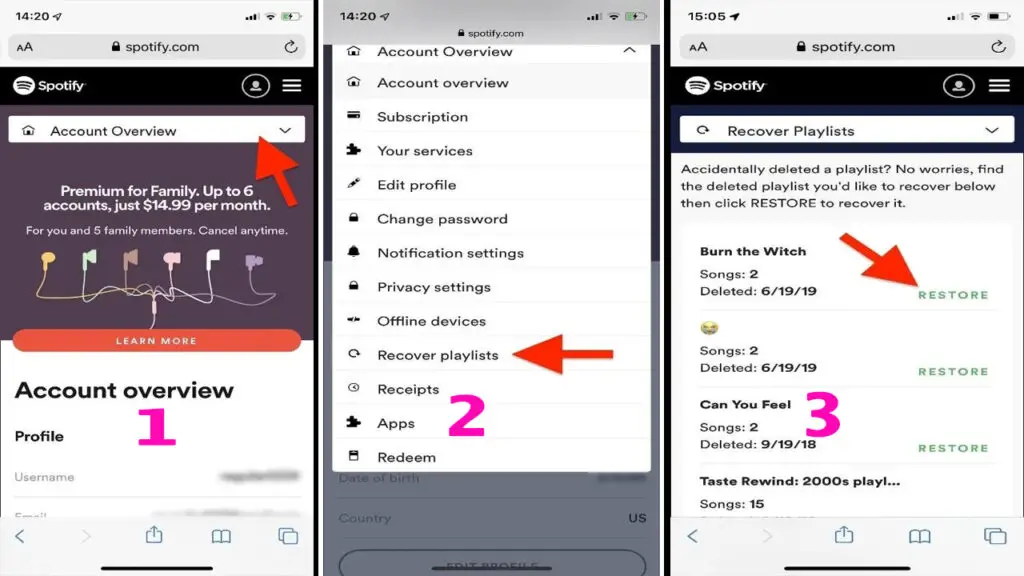
-Form that pull-down menu, select Recover Playlists options. In that Spotify recover playlist menu, your lost or deleted playlists will show up.
Step-4 :
-Tap on the restore button next to a playlist to recover your Spotify playlist.
Now, youll find that recovered playlist at the bottom of your My Spotify Playlists menu in the Spotify app.
Recover Lost Spotify Playlist From An Old Account
You may have created a playlist with good old songs, then switched to another Spotify account. And now you want to get that old playlist at this new account. Is this possible?
Yes, Spotifys recover a playlist from an old account to a new one is totally doable. You have to get in touch through Twitter: @SpotifyCares/ or fill in & submit an online contact form from the help section. Go to the help page and select any of the issues and finally send a question to the Spotify team. Better choose the tab my saved music or playlists have disappeared.
When you get an automated reply, even its from , send a direct email in reply detailing your problem. Someone from Spotify will definitely reach out to you and solve your problem. But to recover Spotify playlist from an old account is only possible if you didnt delete Spotify account already.
How To Recover Deleted Songs From A Playlist?
To recover your deleted songs from a playlist immediately on your PC, press ctrl+z (for Mac) or ctrl+shift+z (for windows). If this doesnt work, then you may have saved your songs anywhere else on Spotify. You should check your music under your library.
Cant find my deleted playlists on Recover Playlist option
It may happen that you cant find your Spotify deleted playlists on the Recover Playlist option. Possibly you are trying to find a playlist of another account of yours. Its possible that earlier you have created your playlist on one account and trying to find it from another one. Sometimes, we even log in to our Spotify account using our Facebook details. In that case, deleted playlist wont show up.
Remember your user name to get access to Spotify easily. Its better to change your name on Spotify which is easy to remember. Recheck whether you have logged in to the right account. If you still cant find your Spotify deleted playlist, then send a ticket to the Spotify support team by submitting an online contact form. They will be glad to help to find your Spotify deleted playlist and add them back to My Spotify Playlist at your account.
Recover Playlist Option Not Working What should I do?
Now sit tight! What should you do if the Recover Playlist option doesnt work at all on your account? Just remember to reach out to the support service guys of Spotify by submitting an online contact form. Spotify has a wonderful and impressive team to solve these types of issues for their subscribers. If its recoverable, they will help your cause. So your long hours to choose the most melodious tunes from piles of other songs wont go to waste.
Some Points To Remember
- If your desired playlist doesnt show up, restart your device and recheck the app again.
- Try logging out from your device and log in again to it. Then check if the playlist reappears.
- If you cant find your Spotify deleted playlist in the Recover Playlist option, try logging in from another account. You might have created the playlist into another account.
- Check out your accounts subscription status. If you are using a free account then obviously didnt create the playlist here.
- You can restore the deleted playlist from your history. Go to the history page from your Spotify app and re-add the songs you have played earlier on that playlist. But this is time-consuming work.
- To keep track of your playlist is always better than to restore deleted playlist. You should try assigning a picture to your playlist. Dont worry! They allow you to change Spotify playlist picture.
- There is a follow option on Spotify where you can follow playlists shared by other users. So its possible that there are always possibilities that someone might like your playlists as well. It can also help if you keep track of those who follow your playlist on Spotify. They may have created their own playlist with the songs from your one. In this way, you can find out your own songs but in a bit harder alternative.
- If you delete an old account, then all the playlist of that account will be lost. You cant possibly recover Spotify playlist form that account.
- If a playlist you are following gets deleted, Recover Playlist option cant bring it back for you.
Final Brief
Having a premium account on Spotify will definitely pay off when you get to use the Spotify recover playlist option. You can regain your deleted songs, even retrieve your lost playlist as well if you use Spotify to recover the playlist prudently. If you lose track of your desired playlist, just dont get frustrated.
Video liên quan
How do I recover a deleted playlist on Spotify mobile?
Related post

Home
Nhà thiết kế WebTôi là admin trang go plus là một người có đam mê với Blogspot, kinh nghiệm 5 năm thiết kế ra hàng trăm mẫu Template blogpsot như" Bán hàng, bất động sản, landing page, tin tức...